Swarm orchestration

tl;dr
Swarm orchestration lets you build a complex feature across multiple phases. You hand the system a design document and a budget, and the swarm decomposes it into phases, launches agents, gates quality between phases, and manages spending – all automatically.
Overview
When a feature is too large for a single agent, swarm orchestration breaks it into phases and runs multiple agents in parallel. You provide a design document and optionally a budget window; the swarm handles decomposition, scheduling, and quality gating automatically.
crosslink swarm init --doc DESIGN.md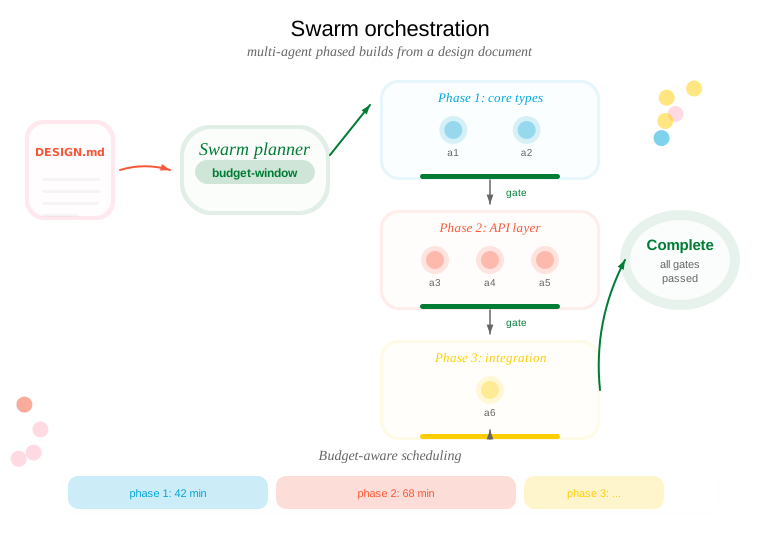
Developing with swarms
Initializing a swarm
You say / do:
“Build this feature across multiple phases. Here’s my design doc.”
You provide a design document describing the feature. The swarm decomposes it into phases and work units automatically.
→
Agent executes:
crosslink swarm init --doc DESIGN-AUTH-SYSTEM.md
crosslink swarm plan-show
Parses the document, creates a phased plan, and stores it on the crosslink/hub branch so all agents can see it.
Planning with budget awareness
You say / do:
“I have a 3-hour budget window. Schedule the phases to fit.”
You set a budget and the swarm figures out how to distribute phases across your available time. Cost estimates improve with each completed phase.
→
Agent executes:
crosslink swarm plan --budget-window 3h
crosslink swarm config --budget-window 3h --model opus
crosslink swarm estimate 1
Plans phase scheduling, configures the cost model, and estimates wall-clock cost for the first phase.
Launching a phase
Swarm planning automatically phases development based on dependency structure into phases, each with multiple components that can be developed in parallel.
You say / do:
“Launch phase 1.”
Each agent in the phase gets its own worktree, branch, crosslink issue, and agent identity. They run in parallel, coordinated through distributed locks.
→
Agent executes:
crosslink swarm launch 1
crosslink swarm status
Launches all agents for phase 1 and shows progress.
You say / do:
“Launch phase 2 – but only if I have budget left.”
Budget-aware launch checks remaining budget before starting. If the estimated cost exceeds your window, the launch is blocked with a warning.
→
Agent executes:
crosslink swarm launch 2 --budget-awarePhase gates
You say / do:
“Run the quality gate for phase 1.”
The gate runs the project’s full test suite. All tests must pass before the phase is considered complete and you can advance.
→
Agent executes:
crosslink swarm gate 1Runs the test suite. Reports pass/fail and any failures.
Checkpointing
You say / do:
“Phase 1 looks good. Record it and move on.”
Checkpointing records timing data, agent results, and handoff notes. This is what resume reads if you come back later.
→
Agent executes:
crosslink swarm checkpoint 1 \
  --notes "Auth models and DB migrations done"
Records phase completion on the hub branch.
Use --force to checkpoint even if the gate hasn’t passed (for partial progress):
crosslink swarm checkpoint 1 --force --notes "3 of 4 agents complete, one blocked"Resuming after interruption
You say / do:
“I’m back. Where did we leave off?”
Resume reconstructs swarm state from the hub branch and tells you exactly what to do next.
→
Agent executes:
crosslink swarm resumeReads checkpoints, lock state, heartbeats, and budget to show: which phases are done, which agents are still running, and which phases are ready to launch.
Managing multiple swarms
You can run multiple independent swarms simultaneously, each with its own plan and lifecycle:
# Create a new swarm (assigns a UUID)
crosslink swarm create

# List all swarms with status
crosslink swarm list

# Switch active swarm context
crosslink swarm switch <uuid>
Each swarm tracks its own phases, agents, and budget independently. Use swarm list to see which swarms are active, planned, or complete.
Editing the plan
After swarm init, you can restructure the plan before or between phases:
# Move an agent to a different phase
crosslink swarm move <agent> --to-phase 2

# Merge two phases into one
crosslink swarm merge 2 3

# Split a phase at a boundary
crosslink swarm split 1 --after <agent>

# Remove an agent from the plan
crosslink swarm remove <agent>

# Change agent execution order within a phase
crosslink swarm reorder <agent> --position 1

# Rename a phase
crosslink swarm rename 1 --name "Database migrations"
Plan editing is useful when gap analysis reveals that the initial decomposition needs adjustment, or when a phase gate exposes dependencies that weren’t visible at init time.
Explicit layer/phase headers
Design documents can specify phases explicitly using H2 headers with Layer: or Phase: prefixes:
## Phase: Database Migrations
- Add user table schema
- Add session table schema

## Phase: API Endpoints
- Add registration endpoint
- Add login endpoint
When these headers are present, swarm init uses them directly instead of auto-decomposing.
Harvesting cost data
After agents finish, harvest cost data to improve future estimates:
crosslink swarm harvestScans completed agents and updates the cost history. The more phases you complete, the more accurate future estimate calls become.
Full workflow example
# 1. Initialize from a design document
crosslink swarm init --doc DESIGN-AUTH-SYSTEM.md

# 2. Review the plan
crosslink swarm plan-show

# 3. Launch phase 1
crosslink swarm launch 1

# 4. Monitor agents
crosslink swarm status

# 5. Once agents complete, run the gate
crosslink swarm gate 1

# 6. Checkpoint and advance
crosslink swarm checkpoint 1 --notes "Auth models and DB migrations done"

# 7. Launch phase 2
crosslink swarm launch 2

# 8. If interrupted, resume later
crosslink swarm resume
See also
- Kickoff for launching individual agents
- Multi-Agent Coordination for distributed locking