Multi-agent coordination

tl;dr
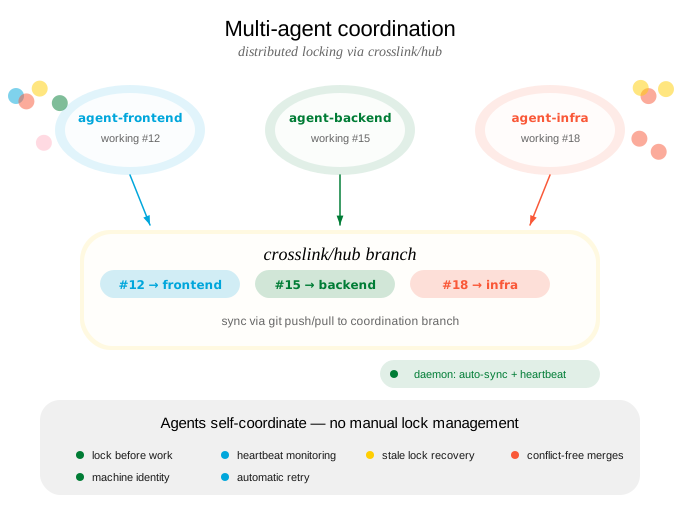
Crosslink lets you tell your agent to work on multiple features at once. Behind the scenes, agents self-coordinate through distributed locking so they never step on each other. You describe the work; the agents sort out who does what.
How it works
Lock state is stored on a crosslink/hub git branch and synchronized via git. Each agent registers a machine-local identity and claims issues through locks. Other agents see which issues are taken and work on available ones instead. All of this happens automatically – you never need to manage locks yourself.
Agent registration
You say / do:
“Work on these three features in parallel.”
You describe the features. The agent (or agents) each register unique identities before starting work.
→
Agent executes:
# Parallel session 1
crosslink agent init agent-frontend -d "Frontend specialist"
# Parallel session 2
crosslink agent init agent-backend -d "API work"
# Parallel session 3
crosslink agent init agent-infra -d "Infrastructure"
Lock coordination
You say / do:
“Go ahead, all three of you.”
You launch multiple agents. Each one automatically claims its issue via a distributed lock. No two agents will work on the same issue.
→
Agent executes:
# Each agent automatically locks its issue
crosslink session work 12   # agent-frontend claims #12
crosslink session work 15   # agent-backend claims #15
crosslink session work 18   # agent-infra claims #18

# If an agent tries a locked issue, it moves on
crosslink issue next        # skips locked issues
Lock-aware commands
These commands automatically respect lock state – no manual lock management required:
| Command | Lock Behavior |
|---|---|
crosslink issue next |
Skips locked issues when recommending work |
crosslink session work <id> |
Warns if issue is locked by another agent |
crosslink create --work |
Only sets as active if not locked |
Daemon operation
You say / do:
“Keep everything in sync while the agents work.”
The daemon runs in the background, pushing heartbeats and flushing state so agents stay coordinated without any manual intervention.
→
Agent executes:
crosslink daemon start    # background process
crosslink daemon status   # verify it's running
The daemon auto-flushes session state every 30s, pushes heartbeats every 2.5 min, and detects stale locks from dead agents.
Coordinating agents
Hub branch
Lock state lives on the crosslink/hub branch, separate from your code branches. The branch contains:
- Lock files (one per locked issue)
- Agent heartbeat timestamps
- GPG/SSH signatures for integrity verification
Agents push to this branch when claiming/releasing locks and pull from it during crosslink sync.
Signature verification
Crosslink supports SSH signature verification for the coordination branch to ensure lock state comes from trusted agents.
You say / do:
“Make sure only our agents can modify coordination state.”
You set up trust once, and all subsequent sync operations verify signatures automatically.
→
Agent executes:
# Each agent generates a signing key on init
crosslink agent init my-agent-1

# Approve trusted agents
crosslink trust approve my-agent-1
crosslink trust list

# Sync with automatic verification
crosslink sync
Launching agents
Kickoff (single agent)
Launch a single background agent to implement a feature:
crosslink kickoff run "add batch retry logic"
crosslink kickoff run "add retry logic" --container docker  # in a container
See Kickoff for the full guide.
Swarm (multi-agent phased builds)
Coordinate multiple agents across phases from a design document:
crosslink swarm init --doc DESIGN.md
crosslink swarm launch 1
See Swarm Orchestration for the full guide.
Container execution
Run agents in isolated Docker containers instead of tmux:
crosslink kickoff run "my feature" --container dockerSee Container-Based Agents for the full guide.