Session workflow

tl;dr
Sessions are crosslink’s memory system. Your agents use them automatically to preserve context across conversations — tracking what’s being worked on, recording breadcrumbs, and passing handoff notes to the next session.
The session lifecycle
Every agent conversation follows this cycle. The hooks handle most of it automatically — you just provide direction.
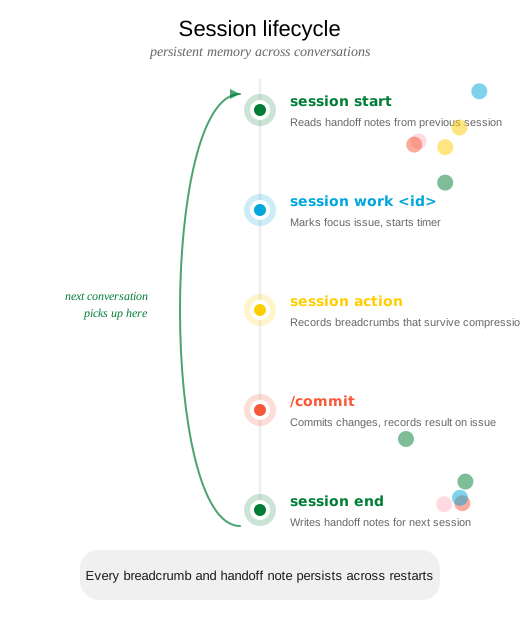
Starting a session
You start a new conversation:
The agent’s session-start hook fires automatically, showing handoff notes from the previous session, cleaning up stale sessions, and displaying open issues.
Your agent picks up exactly where the last one left off.
→
Agent executes:
# Hook fires automatically on session start
crosslink session start
# Output:
# Previous handoff: "Fixed auth bug #3.
#   Dark mode (#2) is next priority."
# Open issues: #2 (high), #5 (medium)
Setting focus
You say:
“Work on the dark mode feature”
The agent finds the matching issue and claims it as its active focus. The work-check hook uses this to track which issue is active — all subsequent code changes are attributed to this issue.
→
Agent executes:
crosslink session work 2
# Output: Now working on: #2 Add dark mode toggle
Or if no issue exists yet:
crosslink quick "Add dark mode toggle" -p high -l feature
# Creates issue AND sets it as focus in one stepEnding a session
You say:
“That’s good for now, let’s wrap up”
The agent writes handoff notes summarizing what was done, what’s in progress, and what’s next — as if briefing a colleague taking over.
→
Agent executes:
crosslink session end --notes "Implemented dark mode \
  toggle in settings.tsx. CSS variables working, tests \
  passing. Still need: system preference detection and \
  persistence to localStorage. Issue #5 is next."
Checking status
You ask:
“What are you working on?”
→
Agent executes:
crosslink session status
# Session #12 (started 2026-03-11 14:30)
# Working on: #2 Add dark mode toggle
# Duration: 23 minutes
Extra features
Stale session detection
Sessions idle for more than 4 hours are automatically ended on the next session start. This prevents “ghost sessions” from accumulating when an agent session is abandoned without a clean end. The auto-end message notes that handoff notes may be incomplete.
Context compression recovery
When Claude Code’s context window fills up, it compresses earlier messages. The session-start.py hook fires on resume and:
- Detects the active session is still running (resume vs. fresh start)
- Adds an auto-comment on the active issue noting the compression event
- Injects the last recorded
session actionas a breadcrumb - Displays current session state
This happens transparently — the agent recovers and continues working without losing track of what it was doing.
Tips
- Agents handle sessions automatically. The hooks manage start, focus, breadcrumbs, and end — you just provide high-level direction.
- Write handoff notes for your future self. Be specific about what’s done, what’s in progress, and what’s next.
- Breadcrumbs are insurance.
session actionis your safeguard against context loss — agents record them frequently during complex work. crosslink quickis the fast path. Creates an issue, labels it, and sets focus in one command.