Design document workflow

tl;dr
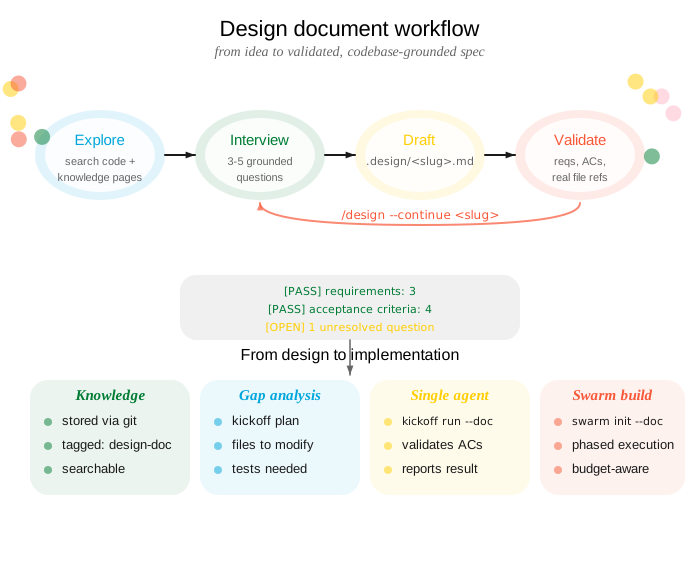
The /design flow turns a rough feature idea into a validated, codebase-grounded design document through interactive iteration. The output feeds directly into /kickoff and crosslink swarm for implementation.
Overview
To start a design session, ask your agent:
/design "add batch retry logic for sync"This triggers the conversational design document workflow.
Starting a design
You say:
“Design the batch retry logic for sync”
Describe the feature in natural language. Optionally reference an existing crosslink or GitHub issue.
→
Your agent runs:
/design "add batch retry logic for sync"

# Or grounded in an existing issue:
/design --issue 42
/design --gh-issue 178
The agent explores the codebase and asks 3-5 clarifying questions before writing anything.
Design workflow
Phase 1: Explore and Interview
The agent reads architecture files, searches for related code, checks existing knowledge pages, and scans .design/ for prior work. Then it asks questions grounded in what it found — every question references specific files, functions, or patterns from the codebase.
Agent: I found these relevant modules:
  - src/sync/mod.rs — current sync pipeline, no retry logic
  - src/sync/error.rs — SyncError enum with 6 variants
  - src/queue/batch.rs — BatchProcessor with configurable concurrency

Questions:
  1. Should retries apply to all SyncError variants, or only
     transient ones (NetworkTimeout, RateLimit)?
  2. BatchProcessor already has a max_concurrency field — should
     retry backoff reduce concurrency, or just delay?
  3. What's the upper bound on retries before we escalate to
     the dead-letter queue in src/queue/dlq.rs?
Answer the questions and the agent proceeds to drafting.
Phase 2: Draft
You answer the questions:
“Only transient errors. Back off with jitter, don’t reduce concurrency. Max 5 retries, then DLQ.”
→
Your agent produces:
.design/add-batch-retry-logic.mdA structured document with:
- Requirements — grounded in real codebase concepts
- Acceptance criteria — mechanically testable
- Architecture — references actual file paths
- Open questions — genuine ambiguities, not guesses
- Out of scope — explicit exclusions
Document structure
# Feature: Add batch retry logic

## Summary
Add exponential backoff with jitter for transient
sync errors in the batch processor pipeline.

## Requirements
- REQ-1: Retry only transient SyncError variants
  (NetworkTimeout, RateLimit) up to 5 attempts
- REQ-2: Use exponential backoff with jitter
  between retries
- REQ-3: Route permanently failed items to the
  dead-letter queue after exhausting retries

## Acceptance Criteria
- [ ] AC-1: NetworkTimeout errors retry up to 5 times
      with increasing delay
- [ ] AC-2: Non-transient errors (InvalidPayload,
      AuthFailure) fail immediately without retry
- [ ] AC-3: Items exceeding max retries appear in
      DLQ with original error context

## Architecture
Modify `src/sync/mod.rs` to wrap the existing
`process_batch()` call in a retry loop...

## Open Questions

<!-- OPEN: Q1 -->
### Q1: Metrics and observability
Should retry counts be exposed via the existing
metrics in `src/telemetry/mod.rs`?
<!-- /OPEN -->

## Out of Scope
- Circuit breaker pattern (separate feature)
- Retry configuration via runtime config file
Validation
After writing the document, the agent runs automatic validation:
Design doc validation:
  [PASS] Summary present
  [PASS] Requirements: 3 items
  [PASS] Acceptance Criteria: 3 items
  [PASS] Architecture references real files
  [PASS] No placeholder text
  [OPEN] 1 unresolved open question remains
Phase 3: Iterate
You say:
“Yes, add metrics. And also handle partial batch failures.”
You can edit the document directly in your editor, resolve open questions by removing the <!-- OPEN --> markers, or tell your agent to continue iterating.
→
Your agent runs:
/design --continue add-batch-retry-logicThe agent detects which open questions you resolved, re-explores the codebase if scope changed, updates requirements and acceptance criteria, and writes the updated document.
Each iteration strengthens the document:
- Resolved questions become concrete requirements
- New scope additions get new acceptance criteria
- Architecture references are updated if new files are involved
- New ambiguities surface as
<!-- OPEN -->blocks
From design to implementation
Once the design document has no unresolved open questions, it’s ready to drive implementation.
Gap analysis
Before launching an agent, run a read-only gap analysis:
crosslink kickoff plan .design/add-batch-retry-logic.mdThis compares the design against the current codebase and reports:
- Which files need modification
- Which acceptance criteria can be verified by existing tests
- Which new tests are needed
- Estimated scope and complexity
Single agent
Launch one agent to implement the entire feature:
crosslink kickoff run "add batch retry logic" \
  --doc .design/add-batch-retry-logic.md
The agent receives the full design document as context and implements against the requirements and acceptance criteria. See Kickoff.
Multi-agent swarm
For larger designs, initialize a swarm that coordinates multiple agents across phases:
crosslink swarm init \
  --doc .design/add-batch-retry-logic.md
crosslink swarm launch 1
The swarm planner splits the design into phases with dependency ordering, budget windows, and phase gates. See Swarm Orchestration.
Knowledge integration
Design documents are automatically stored as crosslink knowledge pages after validation:
crosslink knowledge add "add-batch-retry-logic" \
  --from-doc .design/add-batch-retry-logic.md \
  --tag design-doc
This makes the design searchable by all agents via crosslink knowledge search. If the design was started from a crosslink issue, a plan comment is also recorded on the issue.
Quality standards
The /design skill enforces these standards on every document:
- Requirements reference real codebase concepts, not generic statements
- Acceptance criteria are mechanically testable (a CI system could verify them)
- Architecture references actual file paths verified against the working tree
- No placeholder text (
<...>,TODO,TBD) - Every requirement maps to at least one acceptance criterion
- Genuine ambiguities become open question blocks, not guesses