Knowledge management

tl;dr
Crosslink’s knowledge system is shared memory for your agents. When one agent researches an API, evaluates a library, or documents an architectural decision, that knowledge is automatically available to every other agent working on the project. Knowledge pages live on a dedicated crosslink/knowledge git branch (separate from your code) and sync automatically when agents start sessions.
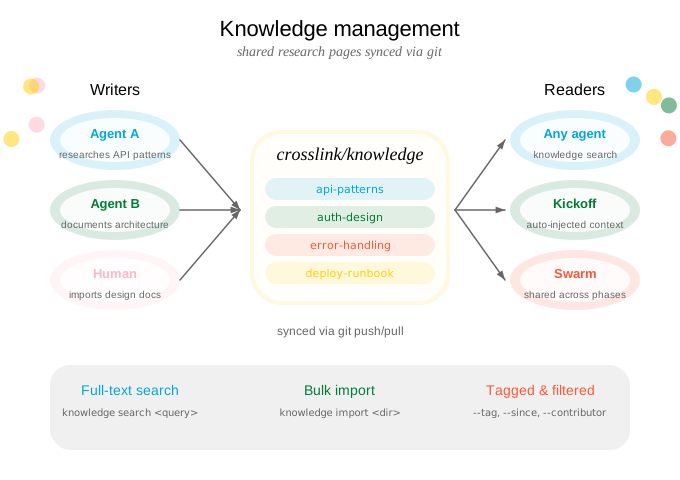
How agents use knowledge
You say:
“Research the best approach for rate limiting”
The agent investigates, then saves its findings as a knowledge page — tagged, sourced, and searchable.
→
Agent executes:
crosslink knowledge add rate-limiting \
  --title "Rate Limiting Strategy" \
  --tag architecture --tag performance \
  --source "https://example.com/rate-limits" \
  --content "After evaluating token bucket vs \
  sliding window..."
Later, when another agent starts a session on a related issue, the session-start hook and knowledge MCP server automatically surface relevant pages. Research done once benefits every agent.
Creating pages
You say:
“Save that auth research to knowledge”
Agents create pages with descriptive slugs, tags for discoverability, and source links for provenance.
→
Agent executes:
# Basic page
crosslink knowledge add api-auth \
  --title "API Authentication Patterns" \
  --content "Findings from investigating..."

# With tags and sources
crosslink knowledge add api-auth \
  --tag security --tag architecture \
  --source "https://docs.example.com/auth"

# Import from a design document
crosslink knowledge add auth-design \
  --from-doc .design/auth-system.md
Browsing and searching
You ask:
“What do we know about caching?”
The agent searches across all knowledge pages with full-text search, filtering by tags, contributors, or date range.
→
Agent executes:
crosslink knowledge search "caching" --context 3
crosslink knowledge search "oauth" --tag security
crosslink knowledge list --tag architecture
crosslink knowledge show api-auth
You can also browse knowledge visually through the TUI (Knowledge tab) or Web Dashboard.
Editing pages
Your agents have a detailed surface to update knowledge as the project evolves.
Append and replace
# Append a new finding
crosslink knowledge edit rate-limiting \
  --append "Update: switched to sliding window after load testing"

# Replace all content
crosslink knowledge edit rate-limiting \
  --content "Completely revised strategy..."

# Add more tags or sources
crosslink knowledge edit rate-limiting \
  --tag load-testing --source "https://example.com/new-ref"
Section-based editing (v0.5.0)
For surgical updates to specific parts of a page:
# Replace an entire section by heading
crosslink knowledge edit api-auth \
  --replace-section "Token Refresh" \
  --content "New approach: use rotating refresh tokens..."

# Append to a specific section
crosslink knowledge edit api-auth \
  --append-to-section "Open Questions" \
  --content "- How do we handle token revocation at scale?"
This is especially useful when agents update knowledge incrementally — adding findings to the right section without disturbing the rest of the page.
Syncing and conflict resolution
Knowledge syncs automatically during crosslink session start and crosslink sync. When two agents edit the same page concurrently, crosslink uses an accept-both merge strategy: both versions are preserved with clear markers, so no work is lost.
Cross-repository querying
Search and view knowledge pages (and issues) from other crosslink-enabled repositories:
# Search knowledge in an external repo
crosslink knowledge search "caching" --from github.com/org/other-repo

# View a specific page from another repo
crosslink knowledge show api-auth --from /path/to/local/repo

# Search issues in an external repo
crosslink issue search "auth" --from github.com/org/other-repo
External queries clone the target repo’s coordination branches into a temporary cache. Results are clearly marked with the source repository. This is useful for:
- Reusing research from a shared library project
- Checking how another team solved a similar problem
- Finding related issues across a multi-repo codebase
Bulk import
Import existing documentation into the knowledge base:
crosslink knowledge import ./docs/research/
crosslink knowledge import ./docs/ --tag imported --overwrite
crosslink knowledge import ./notes/ --dry-run  # preview without writing
Tips
- Save research as you go. When an agent reads API docs, evaluates libraries, or investigates a bug, it should save findings to knowledge so other agents benefit.
- Use descriptive slugs.
api-auth-patternsis better thanresearch-1. - Tag consistently. Use tags like
architecture,security,performance,debugging,api,dependencyto make pages discoverable. - Include sources. Link to the original documentation, blog post, or discussion that informed the page.